colophon

home

the darnedest thing is written and designed by Steven Hum with the following..

production environment

platform

the darnedest thing

comments processing

  • Ruby Mail library
  • Gmail spam filtering

web server

hosting services


Other tools used to construct this site can be found here.

keyboard layouts

are a primary subject of interest on this site. Writing and caring about the tools to do so seem to go hand in hand.

Corne BEAKL Wi

The current daily driver being used to compose these blog entries can be found in daily beakl.

fonts

somehow became a thing on this site.

Source code typefaces have always been of paramount importance, being pervasive in my daily use for coding, email and desktop. PragmataPro and Iosevka were the de facto coding fonts until discovering the Atkinson Hyperlegible Font. Failing to find a monospaced version of that font, i created my own Iosevka variant.

Its use eventually led to a font exploration for ereaders with a dyslexic focus in mind—removing all mirrored glyphs along with other typeface adjustments. Many many font iterations improved the dyslexic readability and distinctiveness of the typefaces created, culminating in the current suite of font variants..

font hierarchy
articulate Atkinson Hyperlegible base font
typograffic Universal Grotesk variant
mu descending cap I with toothless-corner double-storey a
upsilon descending caps I T Y with single-storey a

Each of the above fonts build upon the preceding font. All inherit the base dyslexic glyph set for lower case b d p q and n m u, adding their own distinctive upper and lower case glyph shapes.

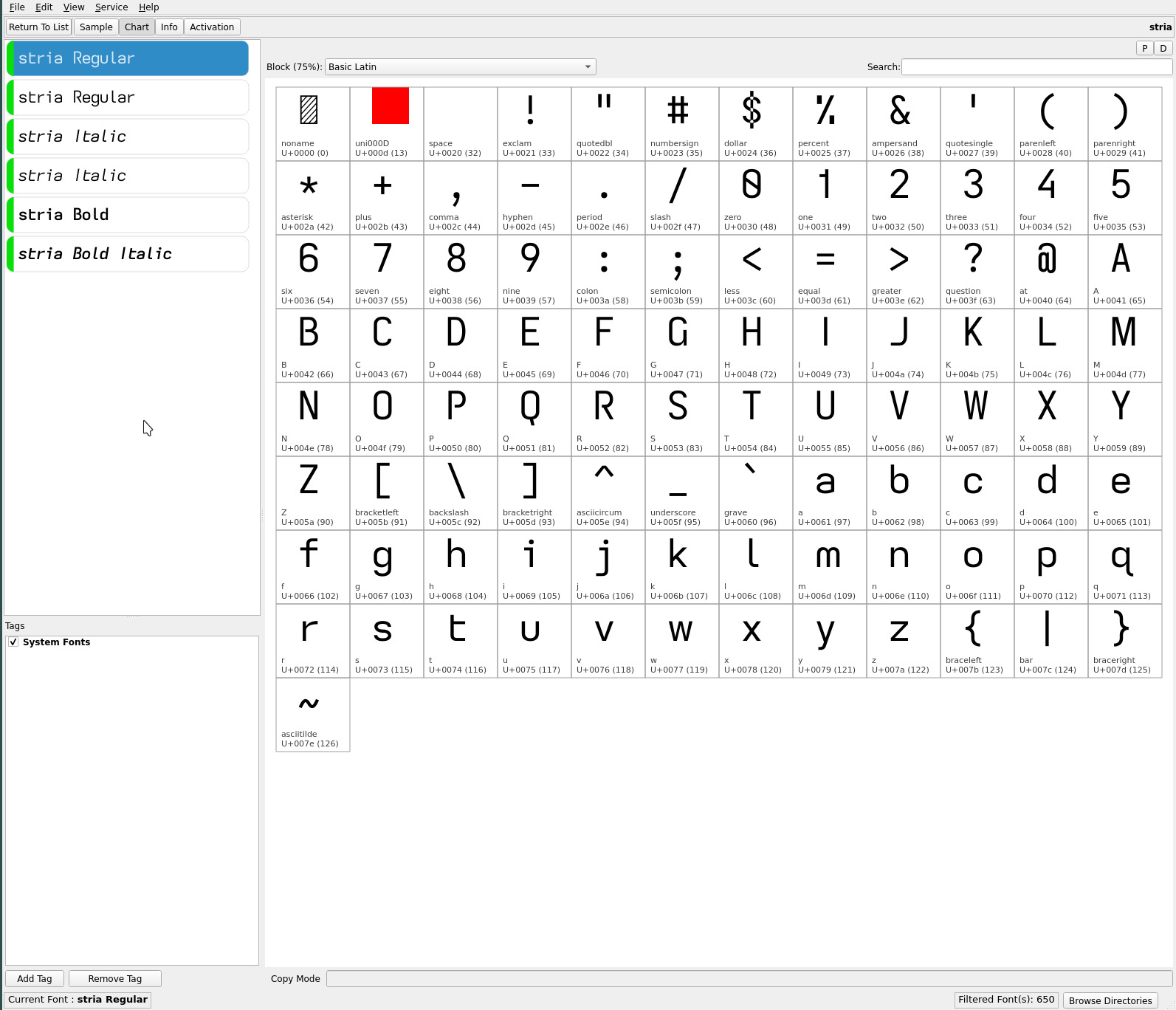
After eliminating all mirrored glyph shapes and experimenting with upper case glyphs with extended descenders, i may finally have settled on a duet of ereading fonts: the stria and grote fonts, a pair of complementary “flat” typefaces (whose influence have also made their way onto this site’s webfonts).

stria font

Fonts may be found in the font repos.

dotfiles

the current dotfiles containing the sources, configuration files and scripts described in the various articles can be found here.

To avoid an unnecessarily large download including all historical commits, pull only the latest repository files with..

git clone --depth 1 git@github.com:sdothum/dotfiles.git

»»  about

monday, 14 march 2016

it’s a slow and methodical process. Step by step, extending an already feature rich window manager, molding it to one’s will. Fixing corner cases that invariably pop up over extended usage. Then adding visual flair with ricing scripts to enhance the user experience and keep it fresh.

Distraction free plugins for vim complete my particular setup which is now complemented by an artful desktop. Time to return to the other threads on this site which were always the original intent of this hardware (keyboard and layouts) and software detour to create a publishing environment..

comment ?

chocofi wi

saturday, 2 may 2026

Chocofi

since Covid the diminutive Georgi keyboard had been my daily driver. Not as a steno keyboard for which it had been designed (and upon which i dabbled with Plover) but as a standard keyboard, albeit with my highly tuned beakl wi layout.

What made this combo unique was not only the minimal finger travel of the beakl layout itself, but the significant gain from the chorded use of just two horizontal rows of keys to achieve a fully functioning keyboard.

Recent developments—one Georgi keyboard toasted by a winter static discharge and its backup now showing early signs of imminent failure (occasional freezing)—prompted skowering for potential 2x6+3 or 2x5+3 split keyboard replacements, to no axail (gboard heavy industries having been shuttered until further notice for awhile now).

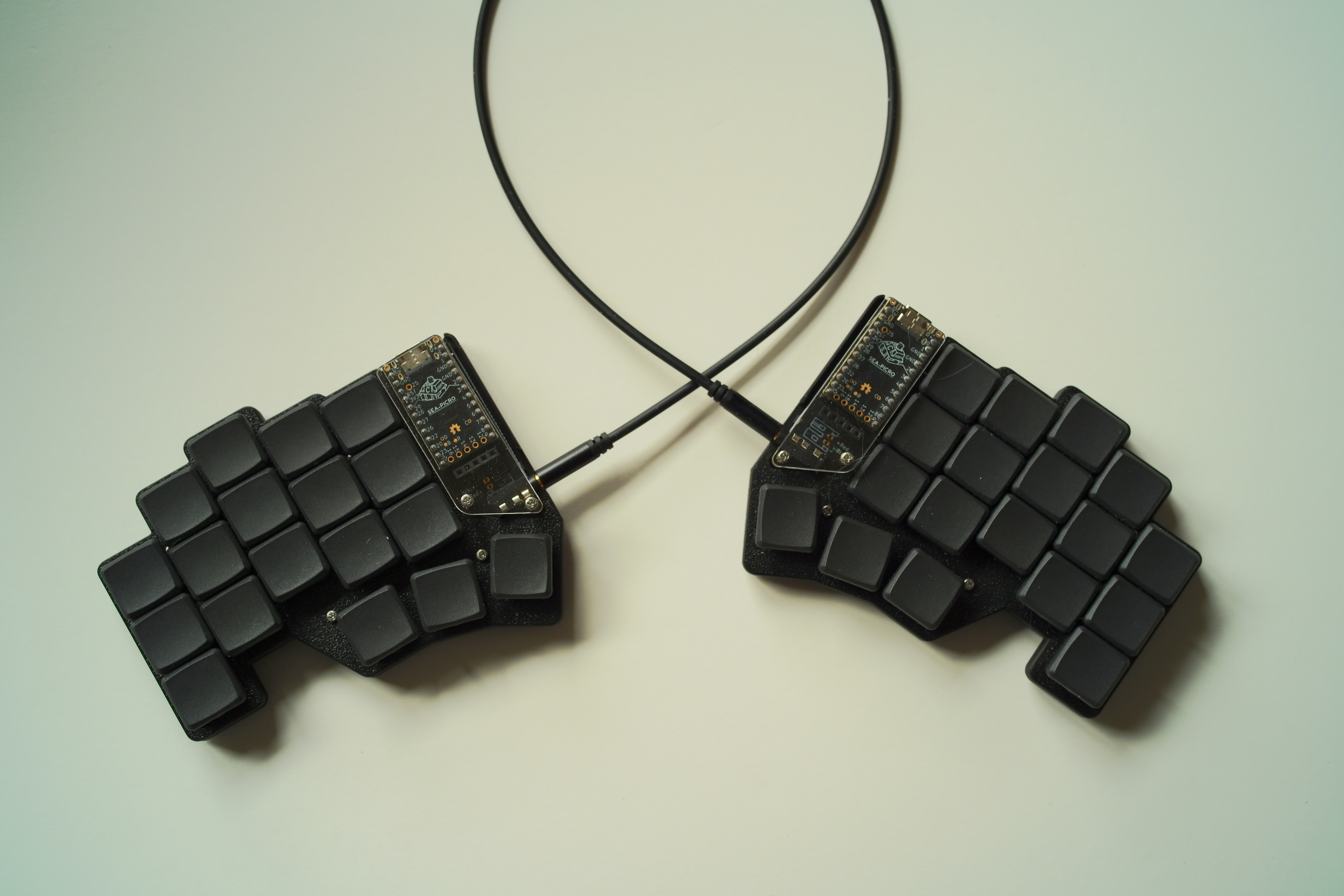
Enter the 3x5+3 chocofi from beekeeb.com. i selected this particular 36 key keyboard because i had already built numerous Corne and Chimera keyboards so felt this a good starting point replacement.

Why not pull out one of my many pre-Georgi split keyboards? They were all Cherry keyswitch based keyboards and i intended to continue using a chorded minimal travel layout with low profile Choc keyswitches and flat MKB keycaps. The recently released 20g Linear “Nocturnal” keyswitches would be close enough to the modded 15g keyswitches of the Georgi—ultra light keyswitches are necessary for effective chording with a light uniform feel.

With the (firmware) chording engine updated to handle a 36 (upto 64) key keyboard, the chocofi with..

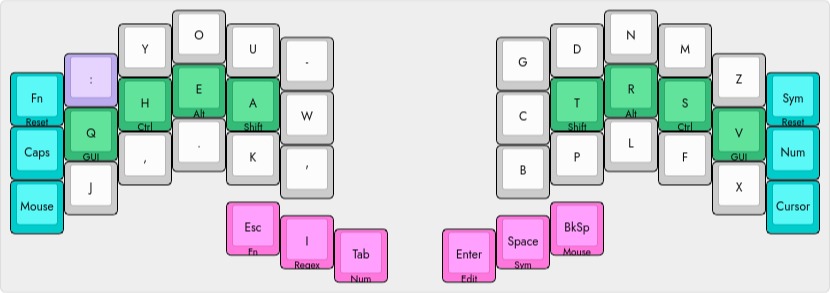
beakl wi
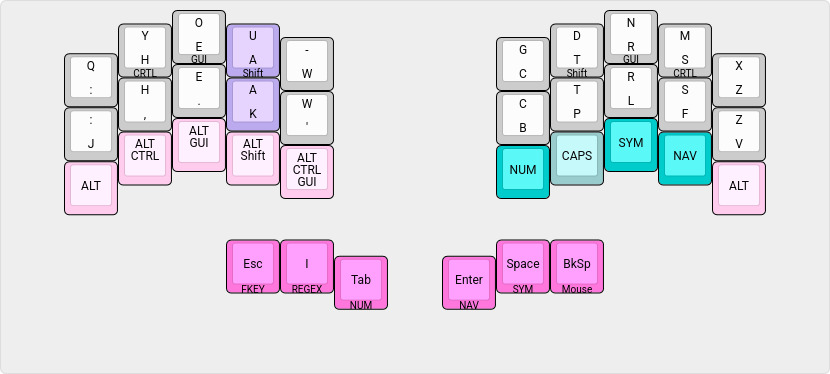
Chocofi BEAKL WI

chord output
q y qu
, . ;
LShift Tab Tab (autorepeat)
LShift Space Space (autorepeat)
LShift Backspace Backspace (autorepeat)
Space Backspace Del (autorepeat)

Some chords have been removed and added since Georgi’s original implementation of beakl wi, as workflow and usage refinements dictated—easy enough to do via the visually oriented json file specification for the keyboard with the chording engine parser.

Notably, the Q has been moved to the top row (from earlier BEAKL Wi layouts) facilitating the ring+middle finger Q Y chord to produce QU—the ring finger extension adopted from Georgi usage.

With the “extra” finger row of the chocofi, the left Alt key modifier combinations are specific to my windowchef desktop management workflow which use these modifiers heavily with the number pad and right hand cursor movement keys (eliminating Georgi’s former pinkie finger modifier combinations—as always, looking for ways to avoid pinkie finger usage). This is an example of a keyboard layout being tailored to one’s particular workflow. The right hand layer toggles provide thumb free access to their associated layers—more of a use of the extra available keys than a pressing need :-)

Because the Tab, Space and Backspace keys are also layer toggles, the Shift chords provide autorepeat functionality when needed.

shift chords
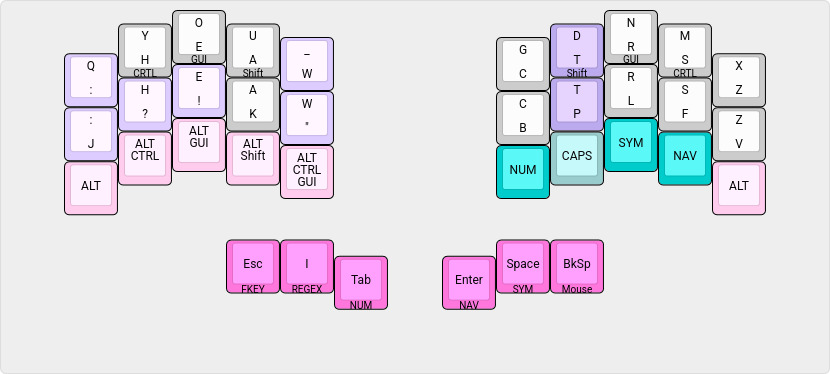
Chocofi BEAKL Wi</span> Shift
Chords

chord output
Shift : ; (semicolon)
Shift , ?
Shift . !
Shift - _ (underscore)
Shift ‘ ” (double quote)

Shift chords are also configured for all the alphabetic letters. This eliminates the necessity of pressing the home row modifier and alpha in sequence to capitalize the letter. Note: Depending on one’s typing speed and form, removing this section (from the json spec) may be necessary to avoid triggering unwanted capitalization.

leader capitalization
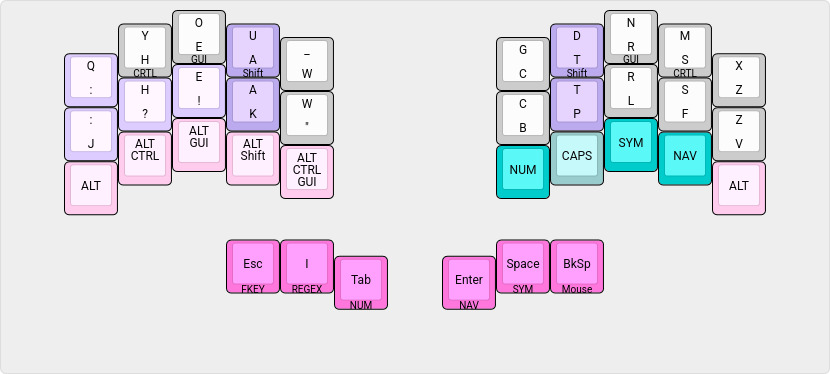
Chocofi BEAKL WI</span> Leader Capitalization

chord output
: Space ”: “ + one_shot_shift
, Space ”, “ + one_shot_shift
. Space ”. “ + one_shot_shift
Shift : Space ”; “ + one_shot_shift
Shift , Space ”? “ + one_shot_shift
Shift . Space ”! “ + one_shot_shift
Shift Space ” “ + one_shot_shift
: Enter : <enter> + one_shot_shift
, Enter , <enter> + one_shot_shift
. Enter . <enter> + one_shot_shift
Shift : Enter ; <enter> + one_shot_shift
Shift , Enter ? <enter> + one_shot_shift
Shift . Enter ! <enter> + one_shot_shift
Shift Enter <enter> + one_shot_shift

These punctation chords provide an efficient means of capitalizing the next letter for long form writing—the thumb chord being more statically available than the home row modifier.

symbols and regex

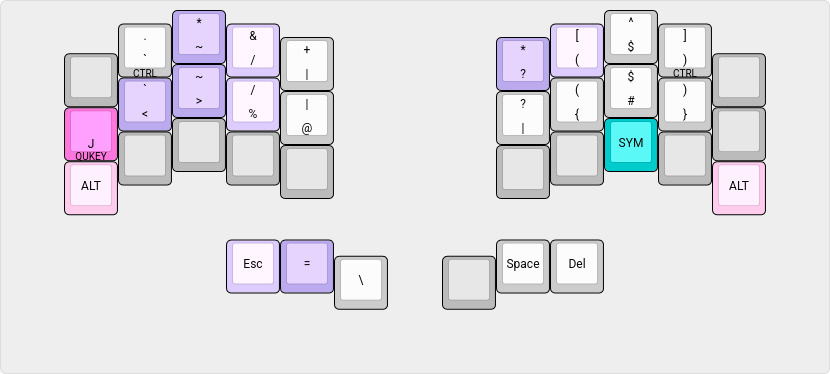
symbol layer
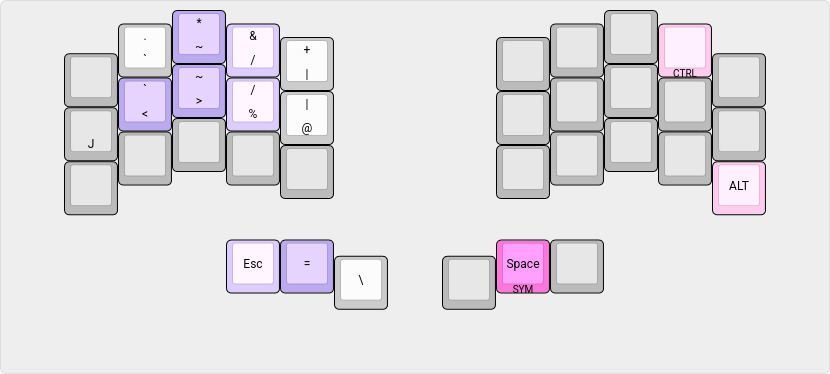
Chocofi BEAKL Wi</span> Symbols

chord output
J < <-
> % ->
Esc = !=
* & ” AND “ (for boolean queries)
~ / ~/

regex layer

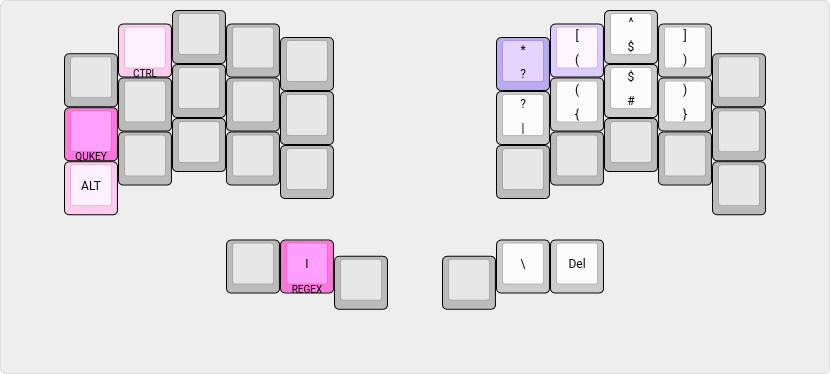
Chocofi BEAKL Wi</span> Regex

chord output
* [ .*

combined symbol / regex layer

Chocofi BEAKL Wi</span> Symbols Regex

it is seldom that i switch to the togglable symbol/regex layer, as i find it takes more thought to create complex regular expressions than to use the thumb layer access to these symbol sets. But it is defined for the day i become a Zen regex master!

numbers
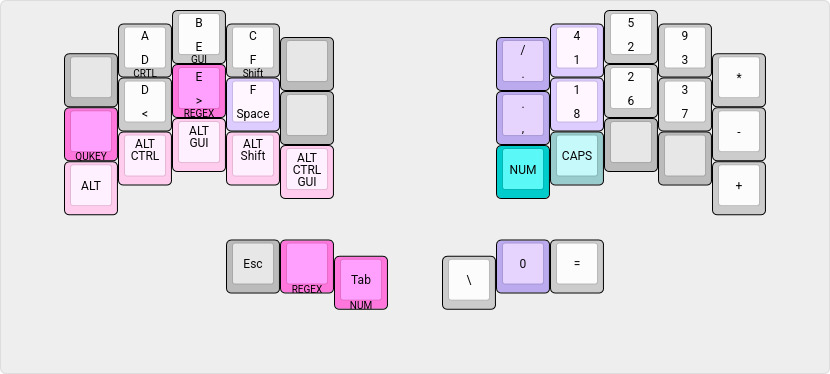
Chocofi BEAKL Wi</span> Number Pad

chord output
/ 4 :
, 8 ;
Space 0 0x
toggle action
Caps Upper case HEX (retoggle to disable CapsLock on exiting layer)

The number keypad is ordered by statistical frequency of the digit and optimized for finger movement.. hence, it’s radical departure from the standard “adding machine” keypad ordering common to keyboards offering a numeric keypad.

Note also the full pinkie column usage for the mathematical operators. This is oriented for light numeric data entry input versus heavy touch typing of serious amounts of data.

The regex layer for the () [] {} bracket pairs is normally accessed by holding down the > “greater than” key. For conformity to the main beakl layer, when the number layer is toggled on, the regex layer is also togglable from the thumb key.

function keys
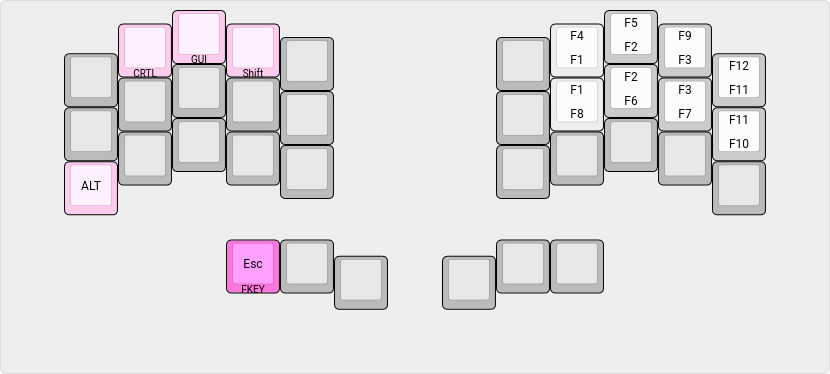
Chocofi BEAKL Wi</span> Fn Keys

The function keys are arranged (mapped) to the number layer keypad order (to avoid finger memory confusion).

quickey layer

QUICKEY raises access to a quick editing input layer overlay for the symbol/regex and number layers..
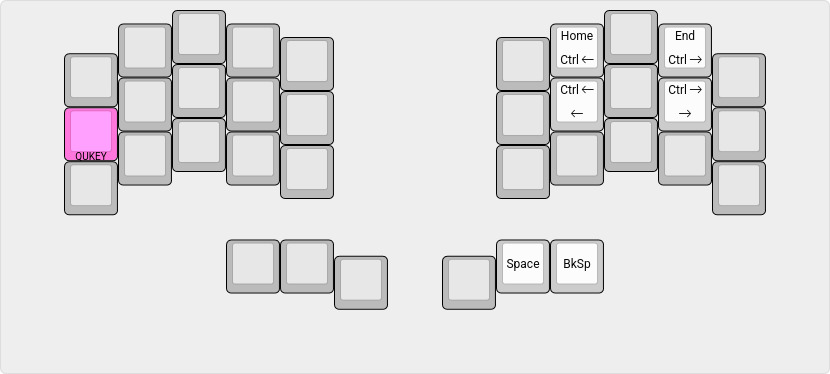
Chocofi BEAKL Wi Quikey Layer

chord output
Space Backspace Del

shortcuts and cursor / mouse

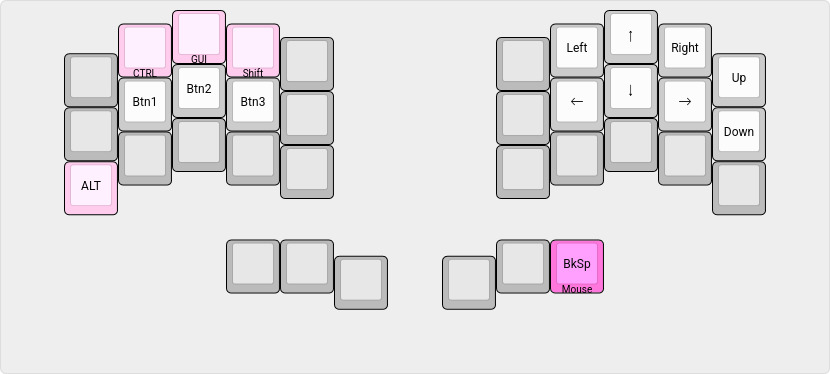
shortcuts / cursor keys
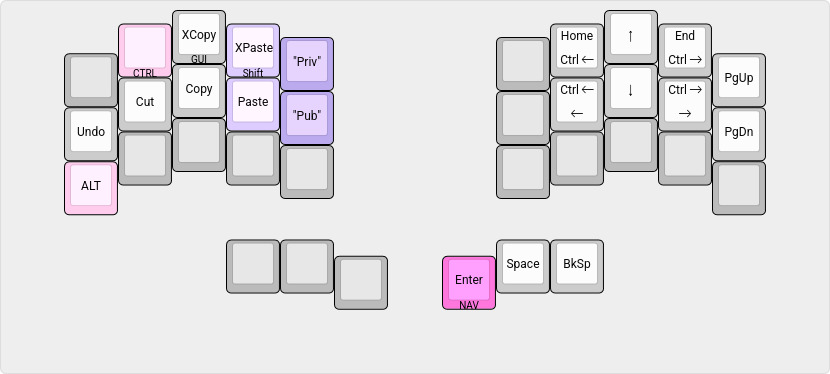
Chocofi BEAKL Wi</span> Cursor
Navigation

chord output
XPaste Private Compile time string
Paste Public Compile time string

mouse navigation

Chocofi BEAKL Wi</span> Mouse

‧   ‧   •   ‧   ‧

Moving from the Georgi steno keyboard to the Chocofi will take some time to acclimate to the different stagger of the finger rows—the Georgi having almost no stagger for steno typing.

However, the thumb to home row position (between the top and middle finger rows) is comparable, so does not feel out of place and should facilitate a short adjustment period. The 20g linear keyswitches do not feel appreciably stiffer than the Georgi’s 15g keyswitches—thankfully, i don’t feel at the moment compelled to swap out the springs for lighter ones :-)

With the extra finger row, already i am wondering.. do i want to try lowing the pinkie finger characters one more stagger? :-o (It would not take much effort to adjust the json template to know :-)


Edit: See Chocofi Wi Stagger for an alternate staggered pinkie finger layout. Edit: See Chocofi Wi Hybrid for a further refinement of the pinkie finger layout.

comment ?

chocofi wi hybrid

saturday, 2 may 2026

after time with the Chocofi Beakl Wi and the Chocofi Beakl Wi staggered layouts, the winner is..

beakl wi hybrid

Chocofi Beakl Wi</span> hybrid

Save for the staggered pinkie finger chord—from the top+middle row to the middle+bottom row (with tuned glyph placements)—the chords for base alpha layer, and the thumb layers remain the same as the non-staggered Chocofi layout.

This layout merges the non- and staggered alpha base layers design, retaining the top corner ring finger Q and X letters and moving the chorded Colon and Z of the non-staggered layout to the staggered middle+bottom chorded position.

The four letters Q X J V are effectively on their own rows—preserving the strength of the Q X ring finger reach along with a relaxed J V and (chorded middle+bottom) Colon Z on the pinkie finger.

i am certain this doesn’t end here as it has only been a week acclimating with the Chocofi keyboard but this layout appears to end the undecided 50:50 preference split held between the non- and staggered BEAKL layouts until now by addressing the (personal) pinkie finger issues experienced with each layout.

The choice of which keyboard layout is best will differ for each users’ hand proportions and pinkie finger strength and agility. Those who are already strong touch typists or play musical instruments will likely prefer the non-staggered layout. Those with short or weak pinkie fingers may gravitate towards the staggered or hybrid layouts.

As always, YMMV.

comment ?

chocofi wi stagger

saturday, 2 may 2026

hot on the heals of Chocofi Wi layout is the contemplated staggered pinkie version of the layout.

The utility of shifting the pinkie cluster down a row is dependent on one’s physical hand proportions. Hands whose pinkie finger length is substantially less than the ring finger may find this staggered layout more relaxed. Those who have good typing hand posture and dexterity—much like a pianist—will tend to overcome pinkie finger length discrepancies and likely find the more traditional row placement adequate both in feel and convention.

The staggered layout variant introduces some subtle pinkie finger character arrangements—due to the pinkie reach moving from the top row to the bottom—and, even, some whole key assignments. The left/right pinkie finger glyph sets remain the same, however, the pinkie reach (feel) rotates their order in the column (which can be seen below)—this reordering has been applied purely by “feel” (level of physical difficulty and letter frequency).

The supplementary chords remain unchanged.

beakl wi stagger

Chocofi BEAKL WI</span> Staggered

chord output
q u qu (order ignored)
, . ;
LShift Tab Tab (autorepeat)
LShift Space Space (autorepeat)
LShift Backspace Backspace (autorepeat)
Space Backspace Del (autorepeat)

shift chords

Chocofi BEAKL Wi</span> Staggered Shift
Chords

chord output
Shift : ;
Shift , ?
Shift . !
Shift - _
Shift ‘

leader capitalization

Chocofi BEAKL WI</span> Leader Capitalization

chord output
: Space ”: “ + one_shot_shift
, Space ”, “ + one_shot_shift
. Space ”. “ + one_shot_shift
Shift : Space ”; “ + one_shot_shift
Shift , Space ”? “ + one_shot_shift
Shift . Space ”! “ + one_shot_shift
Shift Space ” “ + one_shot_shift
: Enter : <enter> + one_shot_shift
, Enter , <enter> + one_shot_shift
. Enter . <enter> + one_shot_shift
Shift : Enter ; <enter> + one_shot_shift
Shift , Enter ? <enter> + one_shot_shift
Shift . Enter ! <enter> + one_shot_shift
Shift Enter <enter> + one_shot_shift

symbols and regex

The thumb layers only differ from the non-staggered BEAKL layout with the top row ALT key to be consistent with the staggered alpha base layer.

symbol layer

Chocofi BEAKL Wi</span> Staggered Symbols

chord output
Q < <-
> % ->
Esc = !=
* & ” AND “ (for boolean queries)
~ / ~/

regex layer

Chocofi BEAKL Wi</span> Staggered Regex

chord output
* [ .*

combined symbol / regex layer

Chocofi BEAKL Wi</span> Staggered Symbols Regex

numbers

Chocofi BEAKL Wi</span> Staggered Number Pad

chord output
/ 4 :
, 8 ;
Space 0 0x
toggle action
Caps Upper case HEX (retoggle to disable CapsLock on exiting layer)

function keys

Chocofi BEAKL Wi</span> Staggered Fn Keys

quickey layer

Chocofi BEAKL Wi</span> Staggered Quikey Layer

chord output
Space Backspace Del

shortcuts and cursor / mouse

shortcuts / cursor keys

Chocofi BEAKL Wi</span> Staggered Cursor
Navigation

chord output
XPaste Private Compile time string
Paste Public Compile time string

mouse navigation

Chocofi BEAKL Wi</span> Staggered Mouse

While symmetry would dictate placing the right hand pinkie navigation keys on the bottom two rows, the unneeded ALT key allows these keys to remain similarly positioned as in other BEAKL Wi layouts—comfortably accessible by the ring finger of the thumb actuated layer.

‧   ‧   •   ‧   ‧

Having two Chocofi keyboards, one with each layout, i have been, thus far, finding the staggered pinkie finger arrangement a comfortable alternative. There is, however, something to be said for not letting one’s typing fingers atrophy too much :-)

For me, it is 6 of one, half dozen of another—having used the Georgi keyboard for so long (where the ring finger to reach the upper and chorded rows has become second nature). Keyboard placement i find is more critical with the staggered layout because the ring finger reach to the corner is very forgiving, whereas, dedicated pinkie usage requires exacting placement for accurate character selection—it is all about mechanics.

i will give the staggered layout a good shakedown. One noticeable positive is the placement of the ALT key in the upper row which the ring finger reaches effortlessly for those kakoune editor keybinds, an application i live in (this is, of course, easily added to non-staggered layout, as well, as a keypress down modifier).

As always, YMMV.

comment ?